

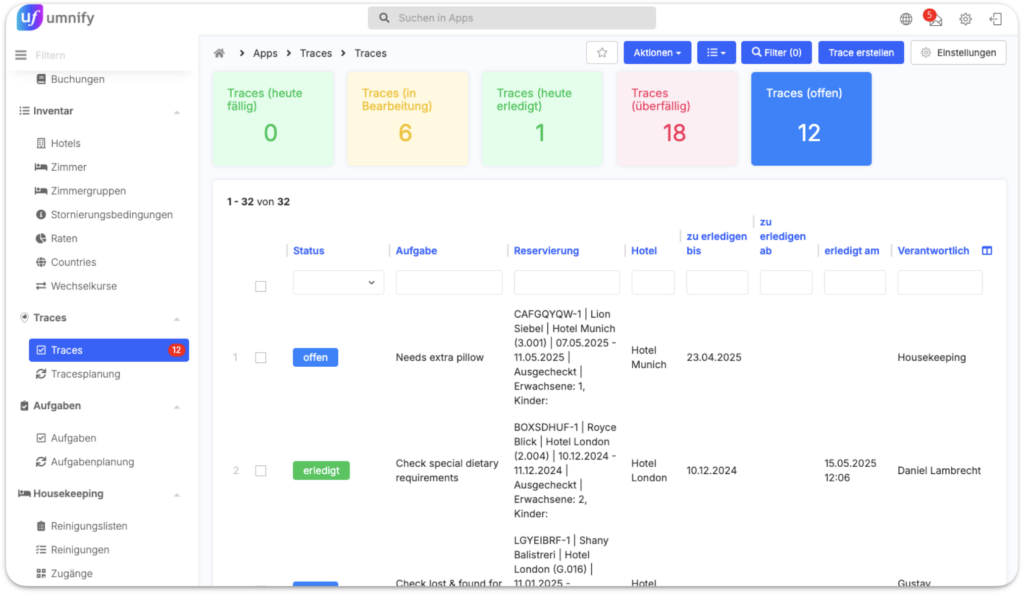
How do you currently keep track of tasks and traces? With umnify #hospitality, it’s easier than ever!
Now you can manage all tasks and traces in one central place. Assign them directly to a reservation, a property, or a room number, track their status, and schedule recurring tasks – all within a single system.
Perfect integration with apaleo ensures that nothing gets overlooked, and your team always stays on top of things.
Now you can…
✅ Keep track of every task’s status
Open, overdue, in progress, or completed.
✅ Clearly assign traces and tasks
Link them to a reservation, a property, a room number, or a department.
✅ Set due dates
Define when a task needs to be completed.
✅ Automate recurring tasks
Create traces that repeat on a set schedule.
✅ Access tasks directly within a reservation
All related tasks are visible in a dedicated tab.
Want to see how it works? Watch our short video:
Already using umnify? Then email us at support@umnify.com – we’ll be happy to activate the right apps for you.
Not an umnify customer yet? Then it’s high time – click here to schedule a demo.